Baby handover sheet: what to tell grandparents, babysitters and nannies
Before someone looks after your baby, write down how to reach you and a backup adult, your baby's usual routine in your own words, where things are, and what you'd like them to log. In Milkstop, a grandparent, babysitter or nanny can join your household with its invite code and log feeds, nappies and naps you can see later.
We make Milkstop, so weigh our view accordingly.
Handing your baby over for the first time is a lot, even when it's to Nana for an afternoon. A one-page sheet means you don't have to remember everything at the door, and a shared log means fewer texts once you're out.
The handover sheet
Fill this in and leave it somewhere easy to find, like on the fridge. It's a checklist of what to write down. The details are yours.
Contacts
- Your phone numbers
- A backup adult they can call
- Your GP or clinic
- The address where your baby is (for an emergency call)
- In an emergency, call 000
Your baby's usual day, in your words
- Feeds: what your baby has and roughly when, the way you usually do it
- Sleep: where and how your baby sleeps, the way you do it at home. For safe sleep, see Red Nose's advice.
- Nappies: where you change them and anything they should know
- Settling: what helps, and any comfort items
Medicines and allergies
- Write down any medicine or allergy information exactly as your doctor or pharmacist gave it to you.
Where things are
- Nappies and wipes
- Spare clothes
- Bottles, and formula or expressed milk
- First-aid kit
What to log while you're out
- Each feed, nappy and nap
- A note for anything unusual
Keep one log instead of texts
Instead of texting you after every bottle, your carer can log it. They join your household with its invite code and log on their own phone. Our guide on how to invite someone to your household has the steps.
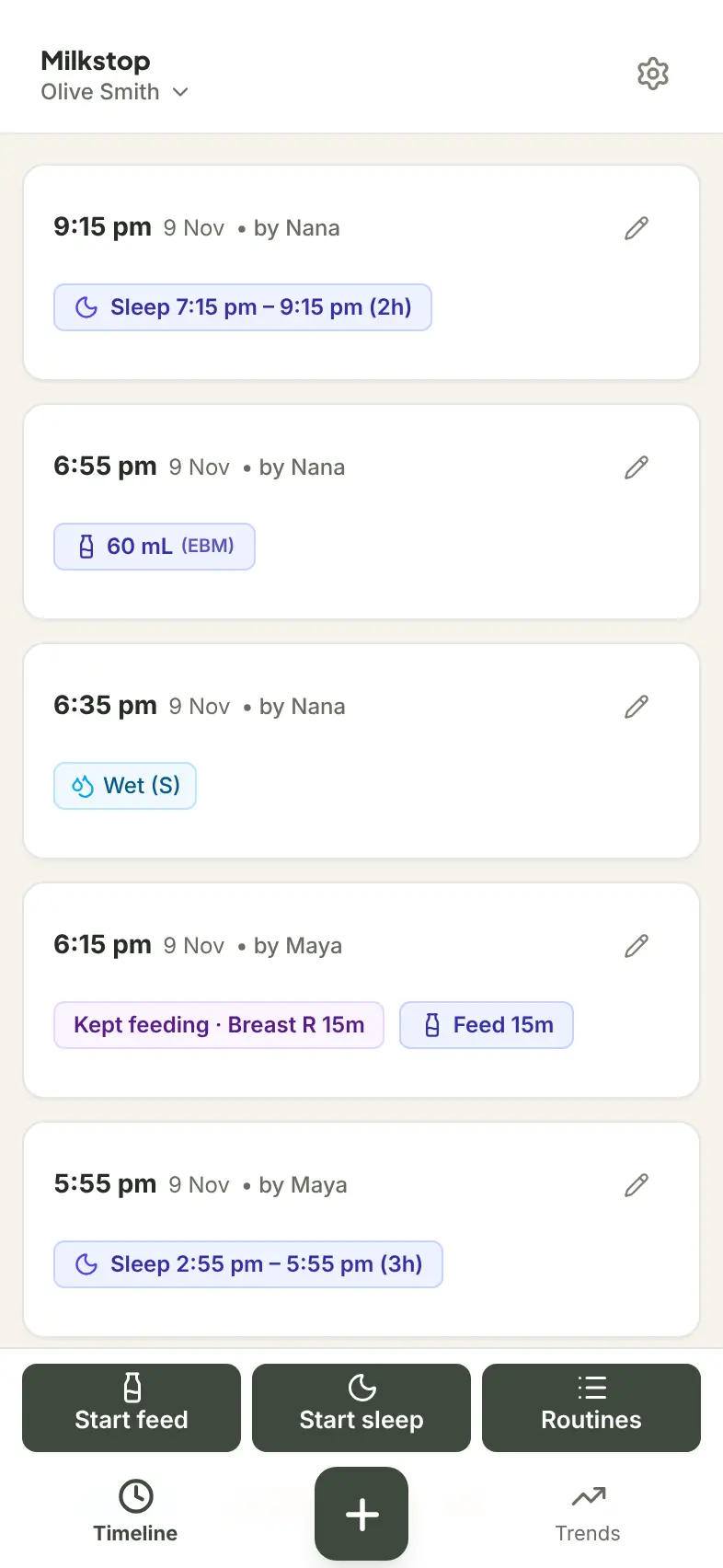
Each entry shows who logged it, for example "by Nana". When you're back, you can see the last feed, the last nappy and when your baby last slept. Their entries appear when you come back to Milkstop, or pull down on the log to refresh.
If they've got no signal, they can keep logging. Entries are saved on their phone and upload when they're back online.
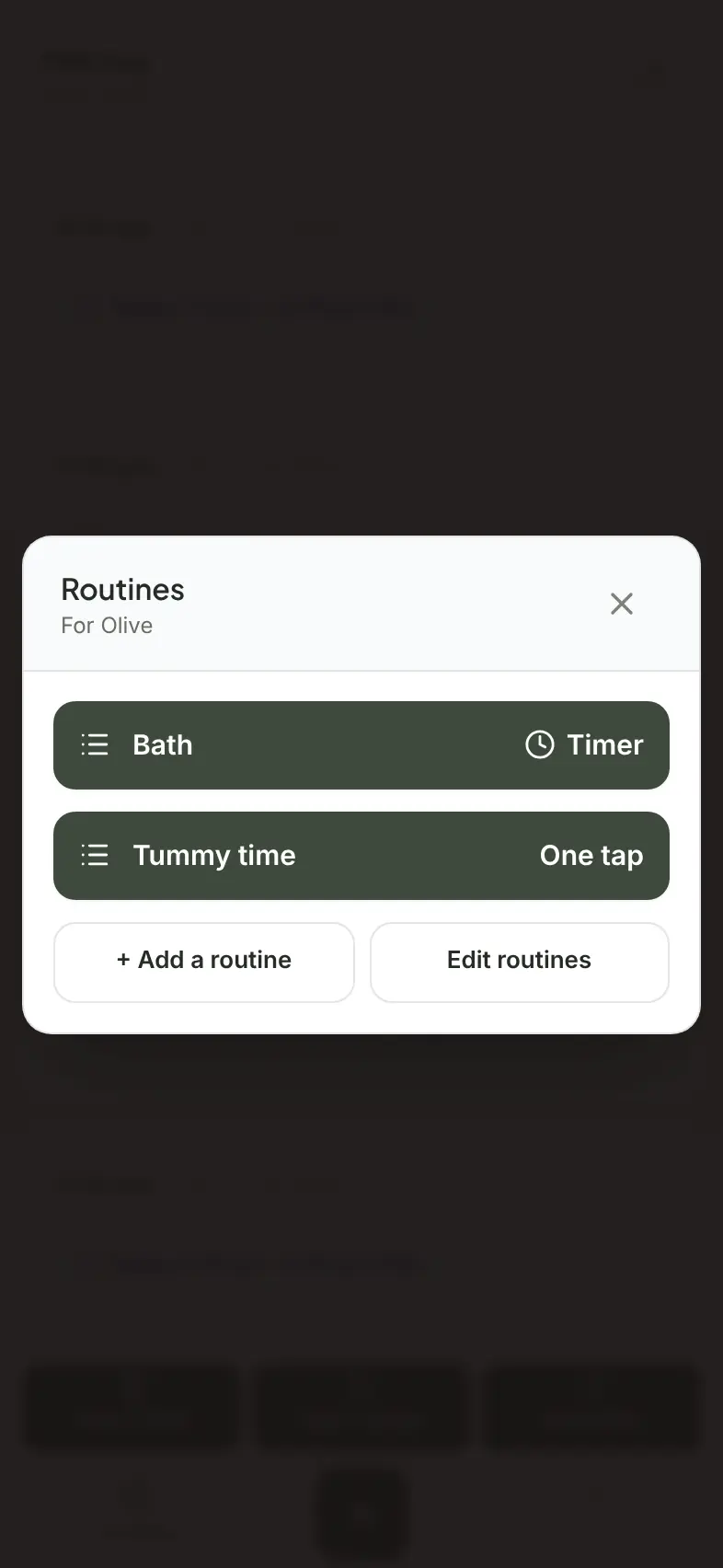
Routines you've added, like a bath or tummy time, are shared with the household, so your carer can log those too. If they're giving bottles, see our bottle feeding tracker guide. Sharing the night shift instead? See how to split night feeds with your partner.
Using Milkstop as a nanny log app
If you have a nanny, Milkstop can be the shared daily log for both of you. Your nanny logs feeds, nappies, naps, bottles and routines in the same household log as you, and you see them on your own phone. Milkstop is free to use, and you can invite as many caregivers as you like.
A nanny who works for more than one family can use one account for both. One account can belong to more than one household, and they switch between them under Switch Active Household in Settings.
Who can see and change what. Everyone in the household can add entries and edit or delete any entry, view charts and export records. Nobody is view-only. Only share your code with people you trust, because anyone who joins can see and change every entry in the household.
The household owner can reset the invite code (Settings → Family & Household → Reset), so the old code can't be used again. People already in the household stay connected.
What it isn't. Milkstop doesn't track nanny hours, pay or timesheets.
Before you pick a nanny log app, it's worth checking:
- Each person has their own sign-in, so nobody shares a password.
- Whether extra caregivers cost more.
- Logging works without signal.
- Who can see and change what.
After the handover
If your midwife, child health nurse or GP asks how things have been going, everyone's entries end up in the same log. You can export it as a printable PDF, with each entry showing who logged it.
FAQs
What should I tell a babysitter about my baby?
How to reach you and a backup adult, your baby's usual routine in your own words, where things are, any medicine or allergy information exactly as your doctor or pharmacist gave it to you, and what you'd like them to write down.
Is there an app a nanny can use to log my baby's day?
Yes. In Milkstop, a nanny joins your household with the invite code and logs feeds, nappies and naps on their own phone. You can invite as many caregivers as you like, and Milkstop is free to use.
Can I limit what a nanny can see or change in Milkstop?
No. Everyone in the household can add entries and edit or delete any entry, so only share your code with people you trust.
Does a grandparent or nanny have to pay?
No. Milkstop is free to use, with no subscriptions and no feature paywalls.
Can a nanny use Milkstop for more than one family?
Yes. One account can belong to more than one household, and they switch between them in Settings.
Does Milkstop track nanny hours or pay?
No. Milkstop is a baby care log. It doesn't track working hours or pay.
What happens when our nanny finishes?
The household owner can reset the invite code in Settings, under Family & Household, so the old code can't be used again. People already in the household stay connected. If your nanny no longer needs Milkstop, they can delete their Milkstop account in Settings. The entries they logged stay in your baby's log, marked as logged by a former member.
What phones does Milkstop work on?
iPhone and iPad, plus a web app at milkstop.app.
General information only. Milkstop is not intended to be a medical device and doesn't replace advice from your midwife, child health nurse, lactation consultant or doctor. If you're worried about your baby, contact a health professional. In an emergency call 000 (AU), 911 (US), 999 (UK) or 112 (EU).
Free · No subscriptions or feature paywalls · Works offline · iPhone app and web app