Take your baby log to the GP or child health nurse: a free PDF of feeds, nappies and sleep
To show your GP or child health nurse how feeds, nappies and sleep have been going, export the dates you need as a PDF. In Milkstop it's free: go to Settings, then Baby & Routine Profiles, tap Export on your baby and choose PDF. It lists what your household logged. It doesn't assess anything.
We make Milkstop, so weigh our view accordingly.
At a weigh-in or check-up, you'll often be asked how feeds and nappies have been going. Midwives and child health nurses often ask about wet and dirty nappies in the early weeks. A log you can print means you don't have to remember it all at 3am.
This guide is about turning what you've already logged into a PDF. It isn't a blank paper template. For a blank chart to print, see our free newborn feeding log.
What to bring to the appointment
Pregnancy, Birth and Baby says every newborn gets an Infant Health Record from the hospital or birth centre, often called by its colour, such as the "blue book" or "purple book". It says to bring it to appointments with your child health nurse, your doctor and other health professionals.
Alongside it, you might bring:
- your questions, written down
- your log, or a PDF of it, if you keep one
How to make a PDF of your baby log in Milkstop
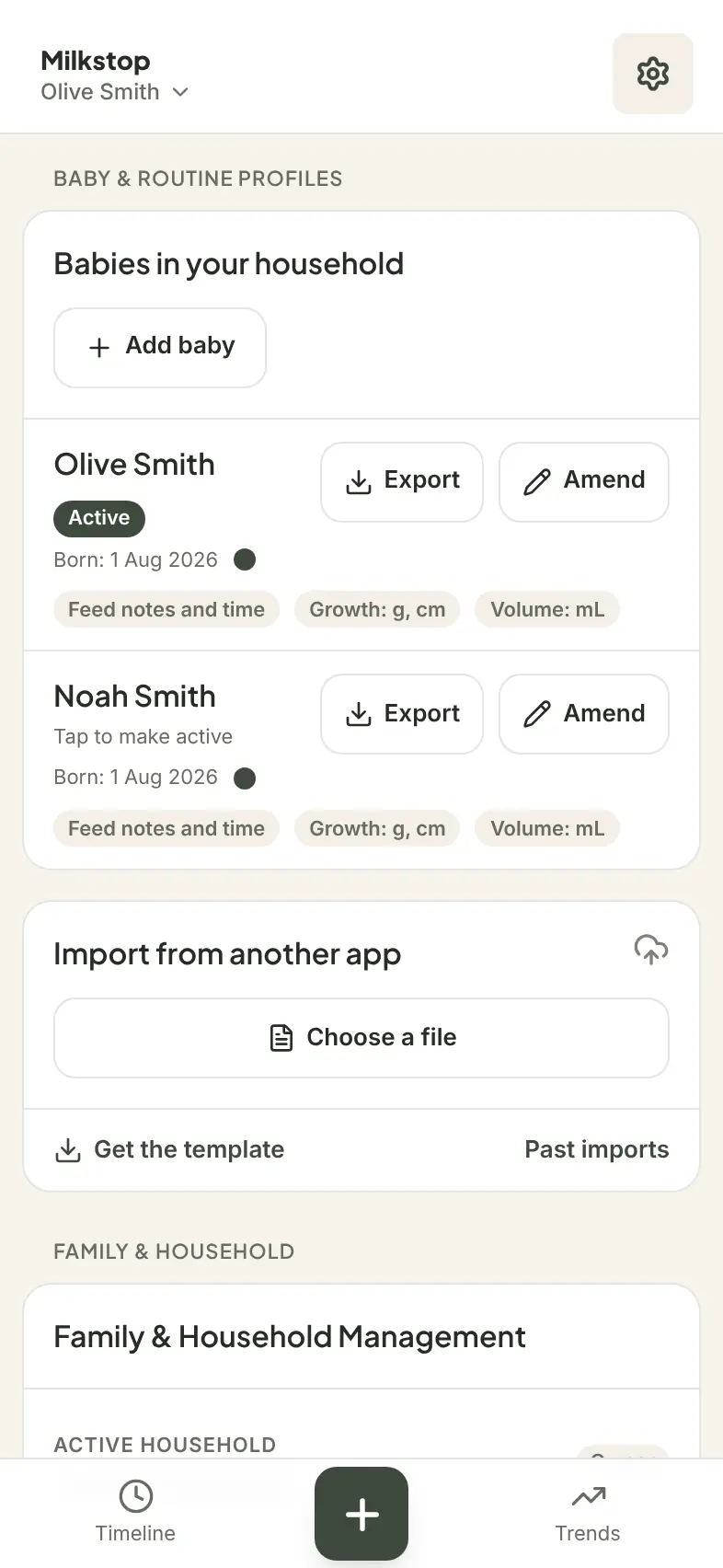
- Open Settings, go to Baby & Routine Profiles and tap Export on your baby.
- Choose PDF ("A printable list of your entries"). CSV is there too, if you'd rather have a spreadsheet.
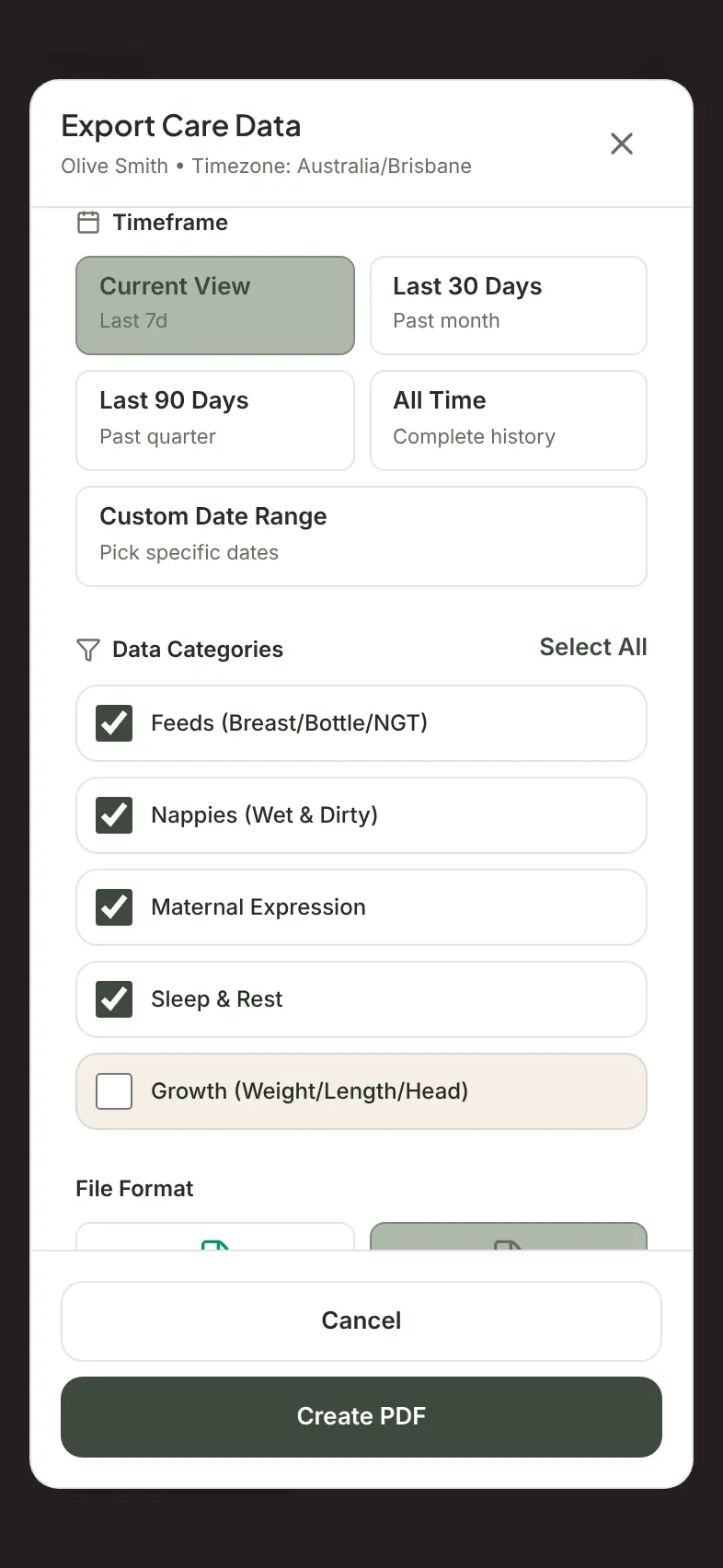
- Under Timeframe, choose Current View (the last 7 days when you export from Settings), Last 30 Days, Last 90 Days, All Time or Custom Date Range. Pick the dates your nurse or GP asks about, or everything since your last visit.
- Under Data Categories, choose what to include: feeds, nappies, expressing, sleep and growth.
- Tap Create PDF, then Share PDF or Save PDF to print it, email it or show it on your phone.
Anyone in your household can export, not just the person who set it up. PDF and CSV exports are free, up to 5 exports per hour per household.
What's in the PDF
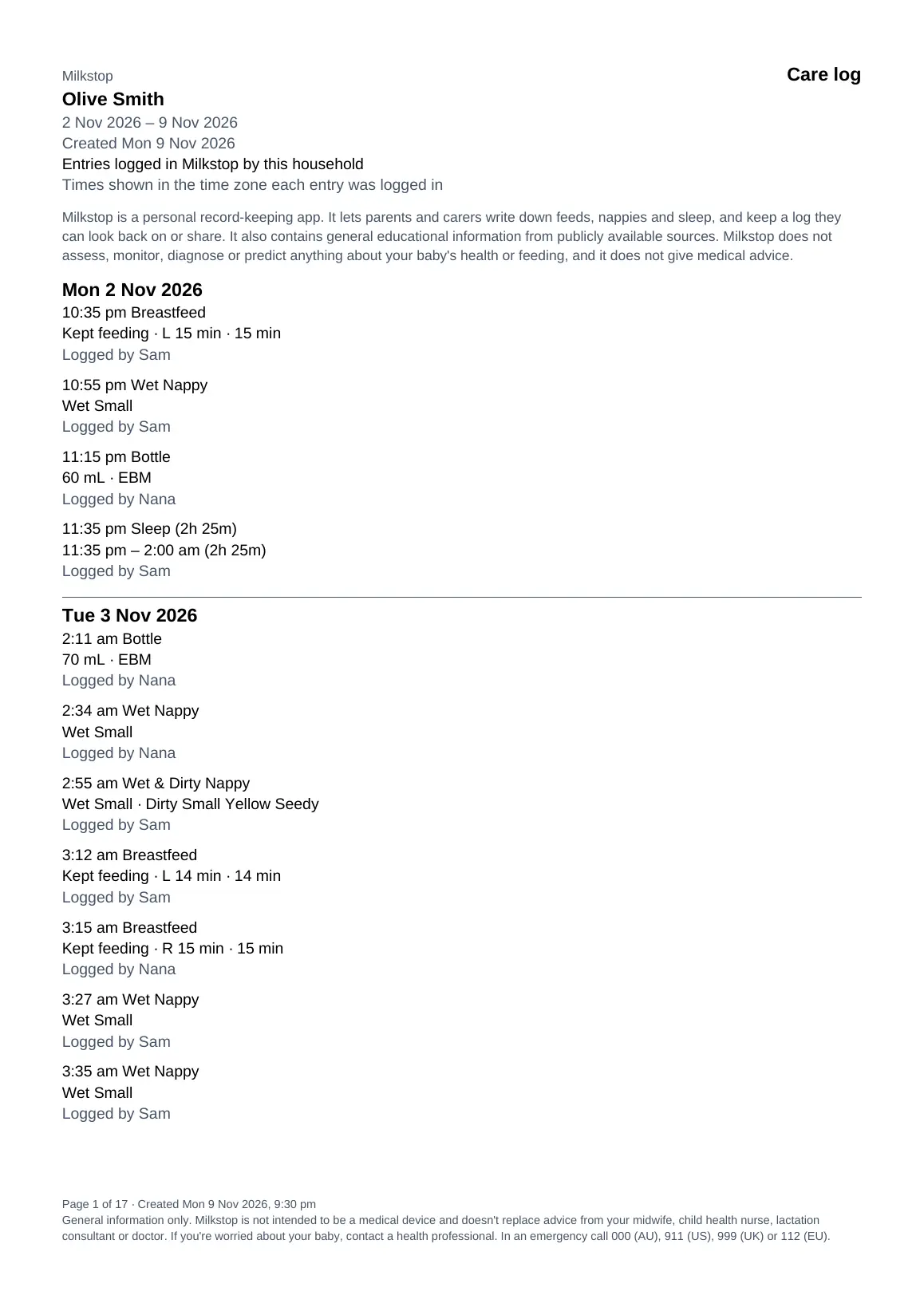
- A heading, "Care log – [your baby's name]", and the line "Entries logged in Milkstop by this household".
- Your entries listed day by day, as logged. There are no totals, averages or charts.
- Each entry with the time, what was logged and who logged it ("Logged by [name]"). Entries you brought in from another app show "Imported from [app]" instead.
- What each entry holds, as it was logged: breastfeed side and minutes and any feed note, bottle amount and milk type, expressing, NGT feeds, wet and dirty nappies with any colour or texture you added, sleep start and end, growth measurements, routines and notes.
- A note that times are shown in the time zone each entry was logged in, the date the PDF was created, page numbers and a general-information notice.
- A4 or US Letter paper, depending on your phone's region.
Tips for a useful log before an appointment
These tips are about keeping the record, not about what your baby should be doing.
- Log as you go, or add it afterwards. If you forget, add a past entry when you remember.
- Use a note for anything you want to ask about, such as "spat up after this feed". It'll be in the PDF next to that entry.
- Let everyone log. If your partner or a grandparent helps, their entries go into the same log, so the PDF covers the whole household. If someone's minding your baby, a carer's entries end up in the same PDF.
- Moving from another app? Bring your history from another app first, and imported entries can go in the PDF too.
If you're offline
Current View still works without signal. Other date ranges need a connection, and entries on your phone that haven't synced yet are only included in Current View. If you're offline, Milkstop shows: "You're offline. Choose Current view to create a PDF now, or try again when you're back online."
What the PDF isn't
The PDF is a record, not an assessment. Milkstop doesn't assess or diagnose anything about your baby's health or feeding. Your midwife, child health nurse or GP interprets it.
Other apps
Some apps put PDF reports on a paid plan. For example, Glow Baby lists "Data export in PDF and CSV (spreadsheet) format" as a Premium feature (glowing.com), and Baby Daybook lists "Data export to PDF" as Premium (babydaybook.app), both checked 10 Nov 2026. In Milkstop, PDF and CSV export are free. More on each: Glow Baby alternative and Baby Daybook alternative.
Related guides
- How to share a baby log with your partner: one log for the household
- Adding a note after a breastfeed: feed notes
- Newborn nappies in the first weeks: wet and dirty nappies
- Bottle feeding tracker
- Help: exporting your data
FAQs
Can I export my baby's feeds and nappies as a PDF for free?
Yes. In Milkstop, PDF and CSV export are free, up to 5 exports per hour per household.
What does the PDF include?
Each entry for the dates you choose, with the time, what was logged and who logged it. You choose whether to include feeds, nappies, expressing, sleep and growth.
Does the PDF show totals or charts?
No. It lists your entries as logged.
Is the PDF a medical report?
No. It's a list of what you and your household logged in Milkstop. It doesn't assess your baby, and your midwife, child health nurse or GP will interpret it.
Should I still bring my baby's health record book?
Yes. Pregnancy, Birth and Baby says to bring your child's Infant Health Record to appointments with your child health nurse, doctor and other health professionals.
Can my partner make the PDF too?
Yes. Everyone in the household can export.
Can I export a spreadsheet instead?
Yes. Choose CSV for a spreadsheet that opens in Excel, Numbers and Sheets.
General information only. Milkstop is not intended to be a medical device and doesn't replace advice from your midwife, child health nurse, lactation consultant or doctor. If you're worried about your baby, contact a health professional. In an emergency call 000 (AU), 911 (US), 999 (UK) or 112 (EU).
Free · No subscriptions or feature paywalls · Works offline · iPhone app and web app