Baby Daybook alternative: share with your partner without Premium
Baby Daybook is free to download, and its Premium page lists family sync, sleep predictions, reminders and PDF export as Premium features (checked 10 Nov 2026). Milkstop is a free shared baby log: invite as many caregivers as you like. You can also import a Baby Daybook backup in Settings, under Import from another app.
Milkstop is our app. We've included it and described it the same way as Baby Daybook, using Baby Daybook's own public information.
What's free in Baby Daybook, and what's Premium
Baby Daybook is free to download from the App Store, with Premium plans as in-app purchases. Its website doesn't describe the free tier on its own. Its Premium page lists these as Premium features (checked 10 Nov 2026):
- Family sync: "securely share your baby's activity logs with your partner, grandparents, or nanny"
- Sleep predictions
- Statistics
- Timeline: "Premium gives you unlimited access to your baby's entire history"
- Reminders
- Data export to PDF
On 10 Nov 2026, the US App Store listed Premium from $1.99 a month, yearly plans at $9.99 and $59.99, and lifetime at $59.99 (discounted) or $99.99. In Australia it was A$2.99 to A$13.99 a month, A$16.49 or A$83.99 a year, or A$83.99 to A$139.00 lifetime. Prices may change.
Sharing with a partner, grandparent or nanny
Baby Daybook lists family sync as a Premium feature. Its Premium FAQ says: "Caregivers connected to your shared baby profiles will also get access to all Premium features, no separate purchase needed."
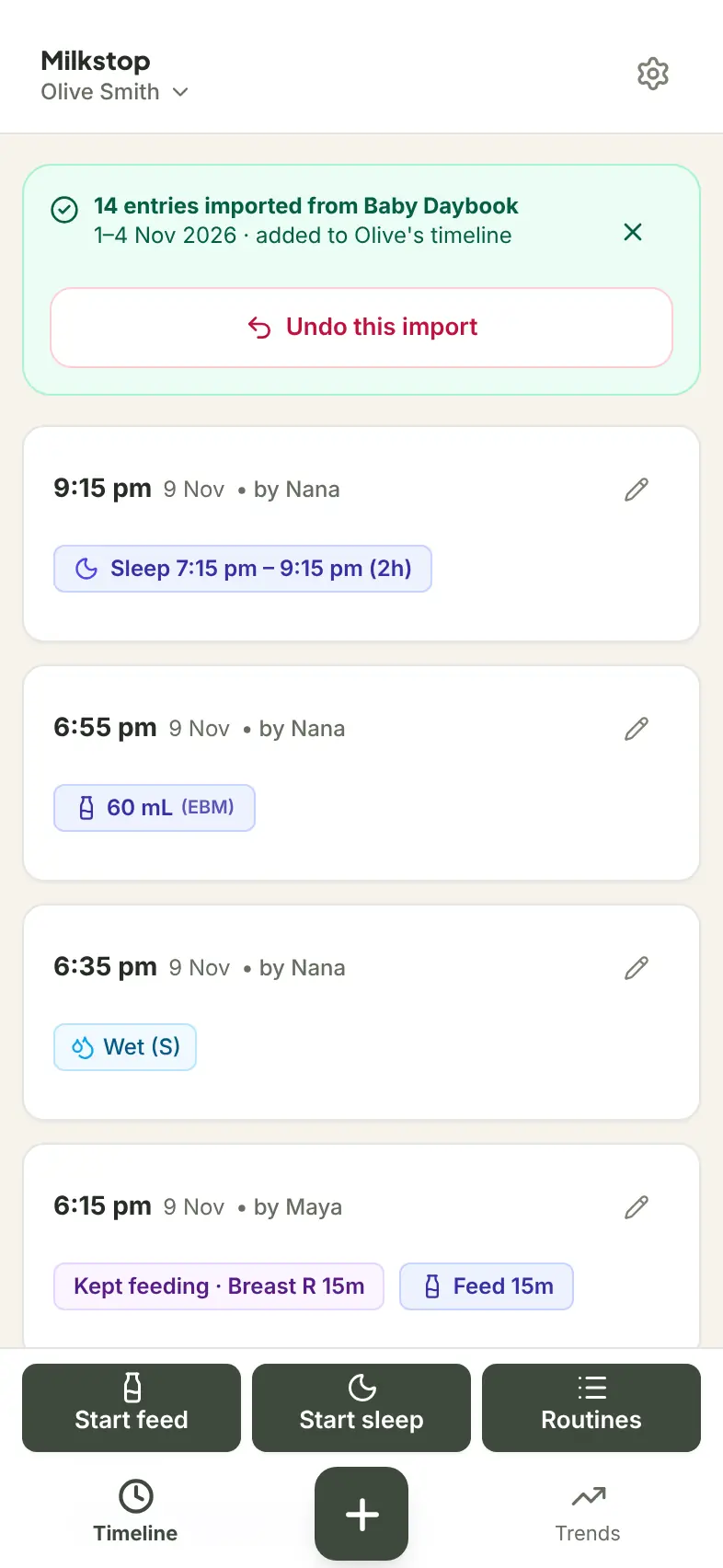
In Milkstop, sharing is free. You share your household's invite code, and each person joins with their own login. You can invite as many caregivers as you like, and each entry shows who logged it. Our guide on how to share a baby log with your partner has the steps.
Baby Daybook and Milkstop compared
| Feature | Milkstop | Baby Daybook | Source |
|---|---|---|---|
| Price | Free to use, with no subscriptions | Free to download; Premium monthly, yearly or lifetime | https://apps.apple.com/us/app/baby-daybook-newborn-tracker/id1446283219 |
| In-app purchases | None listed (as shown on the AU App Store on 10 Nov 2026) | Premium from $1.99 a month to $99.99 lifetime (as shown on the US App Store on 10 Nov 2026) | https://apps.apple.com/us/app/baby-daybook-newborn-tracker/id1446283219 |
| Sharing with family | Invite as many caregivers as you like, each with their own login | "Family sync" is listed as a Premium feature; Premium covers connected caregivers | https://babydaybook.app/premium/ |
| PDF export | Free (CSV or PDF) (free PDF export) | "Data export to PDF" is listed as Premium | https://babydaybook.app/premium/ |
| Import from the other app | Imports a Baby Daybook backup (.db), with a preview first | — | — |
| Sleep predictions and reminders | None: a log only | Premium | https://babydaybook.app/premium/ |
| Offline logging | Log offline; syncs when you're back online | Not stated | — |
| Platforms | iPhone and iPad, plus a web app at milkstop.app | iPhone, iPad and Apple Watch; Android (per babydaybook.app) | https://babydaybook.app/ |
"Not stated" means we couldn't find it on Baby Daybook's own website or App Store listing.
Bring your Daybook history with you
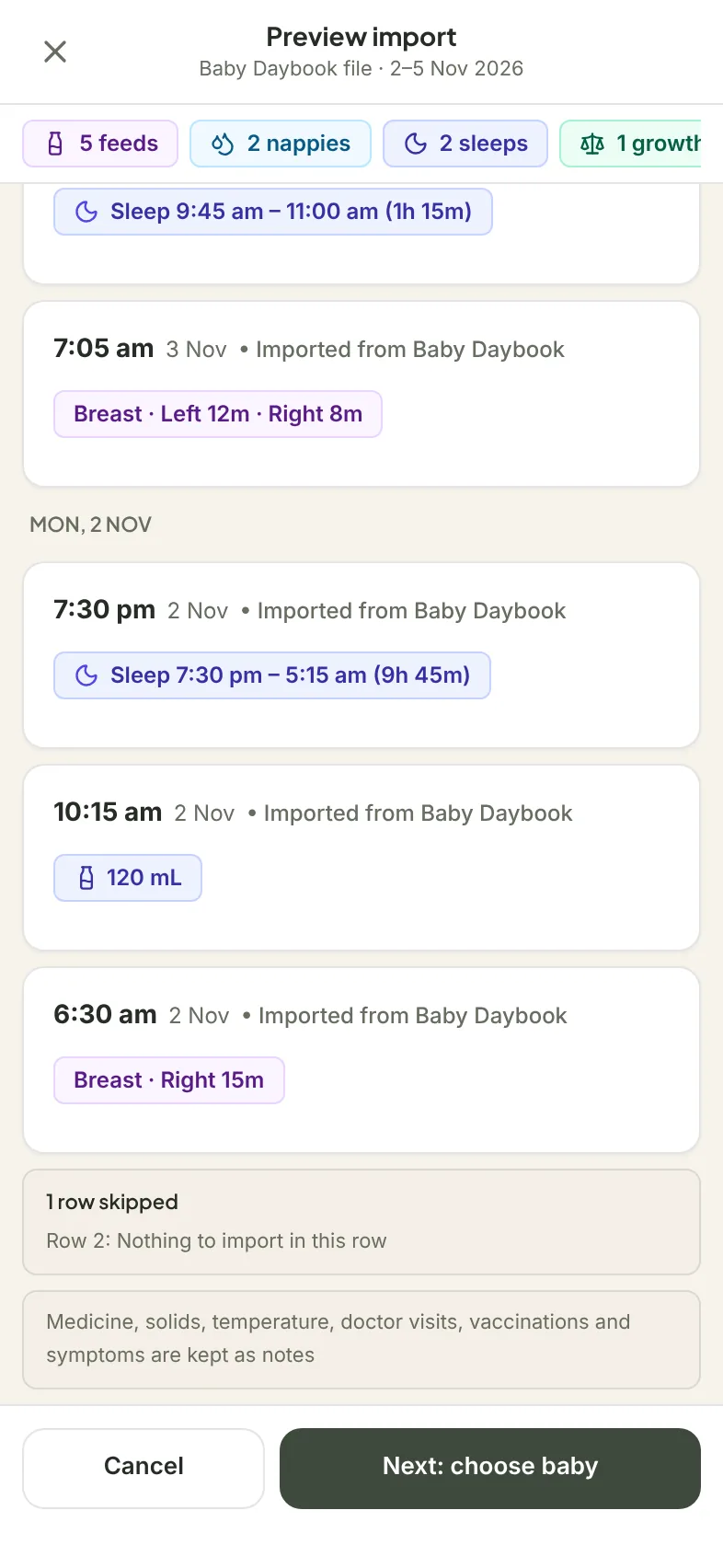
You don't have to leave your history behind. Milkstop can import a Baby Daybook backup, so the weeks you've already logged come too.
- Get your backup file (.db) from Baby Daybook.
- In Milkstop, open Settings, choose Import from another app, tap Choose a file and pick the backup.
- Check the preview. Then choose which baby it's for, and import.
What comes in: feeds, sleep, nappies (diapers), growth and activities like bath and tummy time. Medicine, solids, temperature, doctor visits, vaccinations and symptoms are kept as notes. Activities such as bath and tummy time go under your routines. If it doesn't look right, any caregiver can undo the import.
For more on the import, see how to switch baby tracker apps.
Where Baby Daybook does more
To be fair to Baby Daybook: it has sleep predictions, reminders, an Apple Watch app and an Android app. Its App Store listing describes growth charts, a teething tracker and a health log for symptoms, medications, doctor visits and vaccinations, and its latest release notes say "Growth charts are now free". Premium also covers caregivers connected to your shared baby profiles at no extra cost. If those features are what you use every day, Baby Daybook may suit you.
What Milkstop doesn't do
- No Apple Watch app.
- No percentiles or growth-standard charts. Milkstop charts your own baby's entries only.
- Milkstop runs on iPhone and iPad, plus a web app at milkstop.app.
Other alternatives: Glow Baby alternative, Huckleberry vs Milkstop (Baby Daybook vs Huckleberry?), or how baby tracker apps compare.
FAQs
Is Baby Daybook free?
Baby Daybook is free to download, with Premium plans as in-app purchases. Its Premium page lists family sync, sleep predictions, statistics, reminders and PDF export (checked 10 Nov 2026).
Does Baby Daybook share with a partner for free?
Baby Daybook lists family sync as a Premium feature, and says Premium covers caregivers connected to your shared baby profiles. In Milkstop, you can invite as many caregivers as you like, free to use.
How much is Baby Daybook Premium?
On 10 Nov 2026 the US App Store listed Premium from $1.99 a month, yearly plans at $9.99 and $59.99, and lifetime at $59.99 (discounted) or $99.99. In Australia it was A$2.99 to A$13.99 a month, A$16.49 or A$83.99 a year, or A$83.99 to A$139 lifetime. Prices may change.
Can I move my Baby Daybook history to Milkstop?
Yes. Get your backup file from Baby Daybook. Then in Milkstop, go to Settings, choose Import from another app and pick the file. You'll see a preview first, and you can undo an import.
What comes across from Baby Daybook?
Feeds, sleep, nappies, growth and activities like bath and tummy time. Medicine, solids, temperature, doctor visits, vaccinations and symptoms are kept as notes.
Milkstop is independent and isn't affiliated with or endorsed by Baby Daybook. Baby Daybook is a trademark of its owner. Details about Baby Daybook come from its public website and app listing as checked on 10 November 2026, and may have changed since.
Spotted something out of date or wrong? Email hello@milkstop.app and we'll check it within 5 business days and correct it if needed.
Sources (checked 10 Nov 2026): Baby Daybook Premium; babydaybook.app; Baby Daybook on the US App Store; Baby Daybook on the AU App Store; Milkstop on the AU App Store.