Baby routine tracker app: log bath, tummy time and your own routines in one shared log
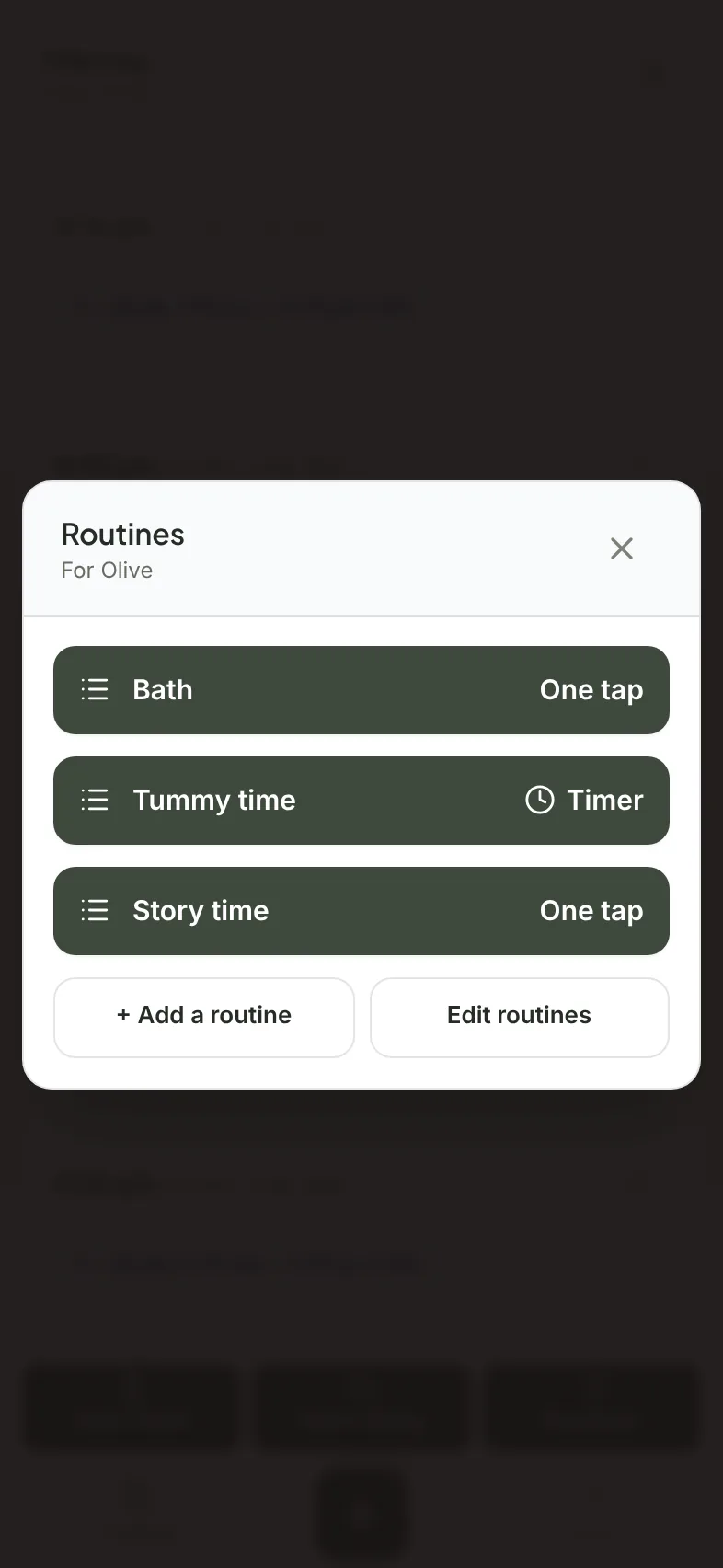
A baby routine tracker lets you log the everyday things beyond feeds and sleep. In Milkstop you add your own routines, like a bath, tummy time or story time, and log each one with a timer or one tap. Routines are shared with your household and sit in the same log as feeds, nappies and sleep.
Routines are names only, with no targets, goals or reminders.
We make Milkstop, so weigh our view accordingly.
If you're already logging feeds and nappies, it helps to have bath time and tummy time in the same place, so whoever takes over can see what's been done.
What a routine tracker should do
- let you name your own routines rather than pick from a fixed list
- time things that last, like tummy time or a walk, and tap-log things that don't, like a bath or a story
- put them in the same timeline as feeds, nappies and sleep
- share them with everyone who helps
- let you get your records out
Adding a routine in Milkstop
- Tap + to open New entry, then choose Routines.
- Tap Add or edit routines.
- Give the routine a name (up to 30 characters), choose Timer or One tap, then tap Add.
Routines are shared with your household, up to 12 per household. They're just names, with no targets, goals or reminders. Adding or editing a routine needs a connection.
Timer or one tap
Choose Timer for things that last, like tummy time or a walk. Start it from Routines in the dock and tap Stop when you're done. Choose One tap for things you just want to note, like a bath. Pick it, check the time, and Save.
You can also log a routine afterwards. Choose it in New entry, set the time and How long (min) for a timer routine, then Save. You can log past times, but not future ones.
Ideas for routines
- Bath
- Tummy time
- Story time
- Skin to skin
- A walk outside
- Playtime
- Brushing teeth
Name them whatever you like. Milkstop doesn't suggest when to do them or for how long.
In the same log as feeds and sleep
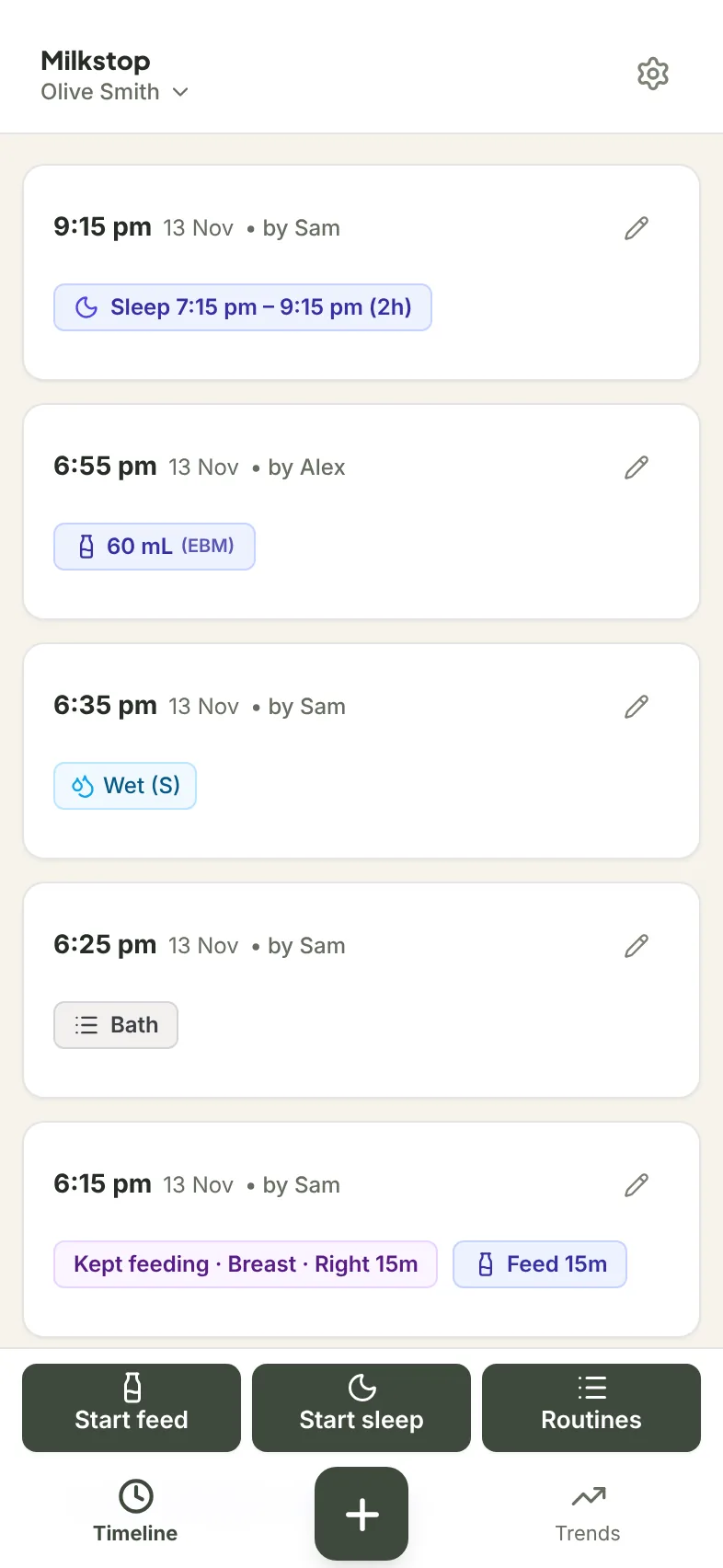
Routine entries show in your timeline and in CSV and PDF exports.
In Trends, choose Routine and pick one to see minutes per day for a timer routine, or how many times a day for a one-tap routine.
You can also log a routine in the same entry as a feed or a nappy.
Everyone sees the same routines
Routines are shared with your household, and each entry shows who logged it. Invite as many caregivers as you like. Entries sync when you're online with the app open. Your partner can pull down on the log to refresh, or reopen the app. Here's how to share a baby log with your partner.
No signal?
Once you've set up a routine, like tummy time, you can time and log it with no signal, and entries sync when you're back online with the app open. Adding or editing a routine needs a connection. More on using Milkstop offline.
What Milkstop doesn't do for routines
- It doesn't make a schedule or suggest times.
- It doesn't send notifications.
Routines are names only, with no targets, goals or reminders. Milkstop does not assess, monitor, diagnose or predict anything about your baby's health or feeding, and it does not give medical advice.
Moving from another app?
If you're moving from Huckleberry, Hatch, Baby Daybook or Baby Tracker (Nighp), you can import your history in Settings under Import from another app. You'll see a preview first, and any caregiver can undo an import. Activities such as bath and tummy time go under your household's routines. See how to switch baby tracker apps.
What it costs
Milkstop is free to use, with no subscriptions and no feature paywalls. PDF and CSV exports are free, up to 5 exports per hour per household.
Download Milkstop on the App Store
Related
- Tummy time log: time each session and see the minutes per day
- Newborn tracker app: one free log for both parents
- Feed and nappy tracker app: feeds and nappies in one log
- How to share a baby log with your partner: one log for the household
- A baby tracker that works offline: logging without signal
- Baby log PDF for your GP or child health nurse: export what you've logged
- Switch baby tracker apps: bring your history with you
- Help: support questions
FAQs
Is there a free baby routine tracker?
Yes. Milkstop is free to use, with no subscriptions and no feature paywalls. You can add your own routines and log them with a timer or one tap.
What can I log as a routine?
Anything you give a name, like a bath, tummy time, story time or a walk. A household can have up to 12 routines.
Can my partner see the routines I log?
Yes. Routines are shared with your household, and each entry shows who logged it. Invite as many caregivers as you like.
Does Milkstop remind me when it's time for a routine?
No. Routines are names only, with no targets, goals or reminders.
Can I log routines offline?
Yes, once you've set a routine up. Entries sync when you're back online with the app open. Adding or editing a routine needs a connection.
Can I export my routines?
Yes. Routine entries show in CSV and PDF exports. PDF and CSV exports are free, up to 5 exports per hour per household.
General information only. Milkstop is not intended to be a medical device and doesn't replace advice from your midwife, child health nurse, lactation consultant or doctor. If you're worried about your baby, contact a health professional. In an emergency call 000 (AU), 911 (US), 999 (UK) or 112 (EU).
Free · No subscriptions or feature paywalls · Works offline · iPhone app and web app