Pumping tracker app: log each expressing session, free and shared with your partner
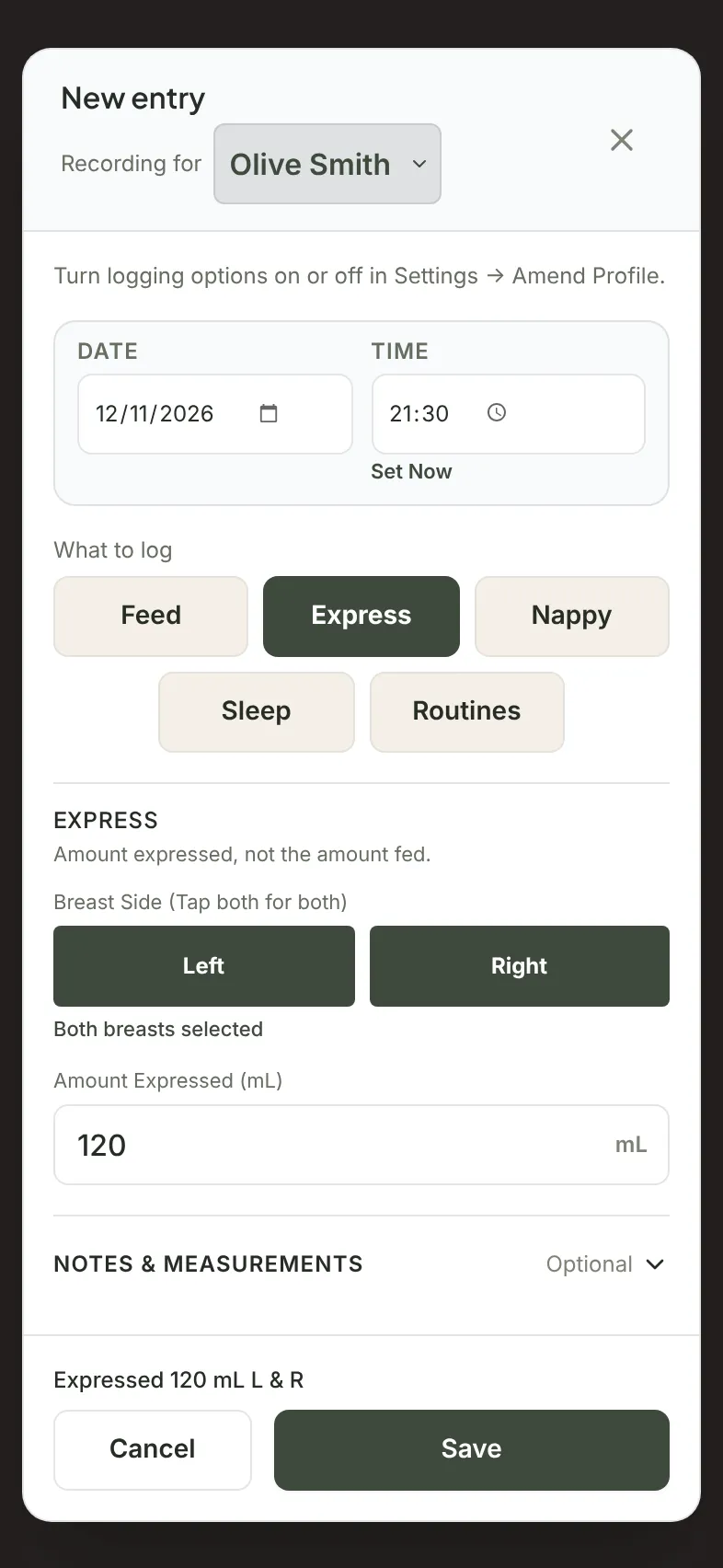
A pumping tracker app records each expressing session: the time, which side, how much you expressed, and a note if you want one. In Milkstop it's free: choose Express in a new entry, pick Left, Right or both and enter the amount. Trends shows how much was expressed each day, and your partner sees the same log once it syncs.
We make Milkstop, so weigh our view accordingly.
What a pumping tracker should do
Whatever app you use, look for these things:
- Time and side for every session. Left, right or both, saved with the session so you can scroll back and check.
- The amount, in your units. mL or fl oz, whichever you use.
- A place for a short note. Anything you want to remember, in your own words.
- A daily total of what you logged, added up by day.
- Pumping in the same log as feeds. Breastfeeds, expressing and bottles on one timeline.
- One log for both of you. If your partner preps and gives the bottles, it helps when everything lands in the same place.
- Works without signal. Pumping rooms and dark bedrooms aren't known for good reception.
- A way to get your data out. An export you can keep or share.
- It's clear what's free, so you know before you start.
Logging a pumping session in Milkstop
- Open New entry. Tap the + button in the centre of the dock.
- Choose Express. It's under "What to log".
- Choose a side. Tap Left, Right or both.
- Enter the amount. Type it into "Amount Expressed", in mL or fl oz. The hint reads "Amount expressed, not the amount fed."
- Tap Save. Check the date and time first, and add a note under "Notes & measurements" if you want.
Forgot to log one? Set the "Date" and "Time" before you save. You can log past times, but not future ones. To change an entry later, open it and the same sheet appears as "Edit entry".
Don't see Express? Go to Settings → Baby & Routine Profiles, tap Amend on your baby, and turn on Breast Milk Expression under Care Logging Preferences. It's on by default.
Milkstop saves one amount for each session, with the side or sides you picked.
Pumped milk and bottles are logged separately
Expressing and Bottle are different entries:
- Expressing (Pumping): Tracks milk pumped from the mother's breasts (select Left, Right, or Both sides, and input total mL). This reflects maternal milk output.
- Bottle: Tracks milk actually consumed by the baby (input total mL and specify milk source: Expressed Breast Milk, Infant Formula, or Fortified EBM). This is the amount you log as given to your baby.
So when your partner gives a bottle of expressed milk, they log a Bottle with EBM. See our bottle feeding tracker guide.
Pumping and breastfeeding in one log
Breastfeeds, expressing and bottles sit on one timeline. You can log a breastfeed and an expressing session in the same entry, or log each on its own. See the breastfeeding tracker app, and our triple feeding log guide for rounds of breastfeed, top-up and expressing.
Daily totals in Trends
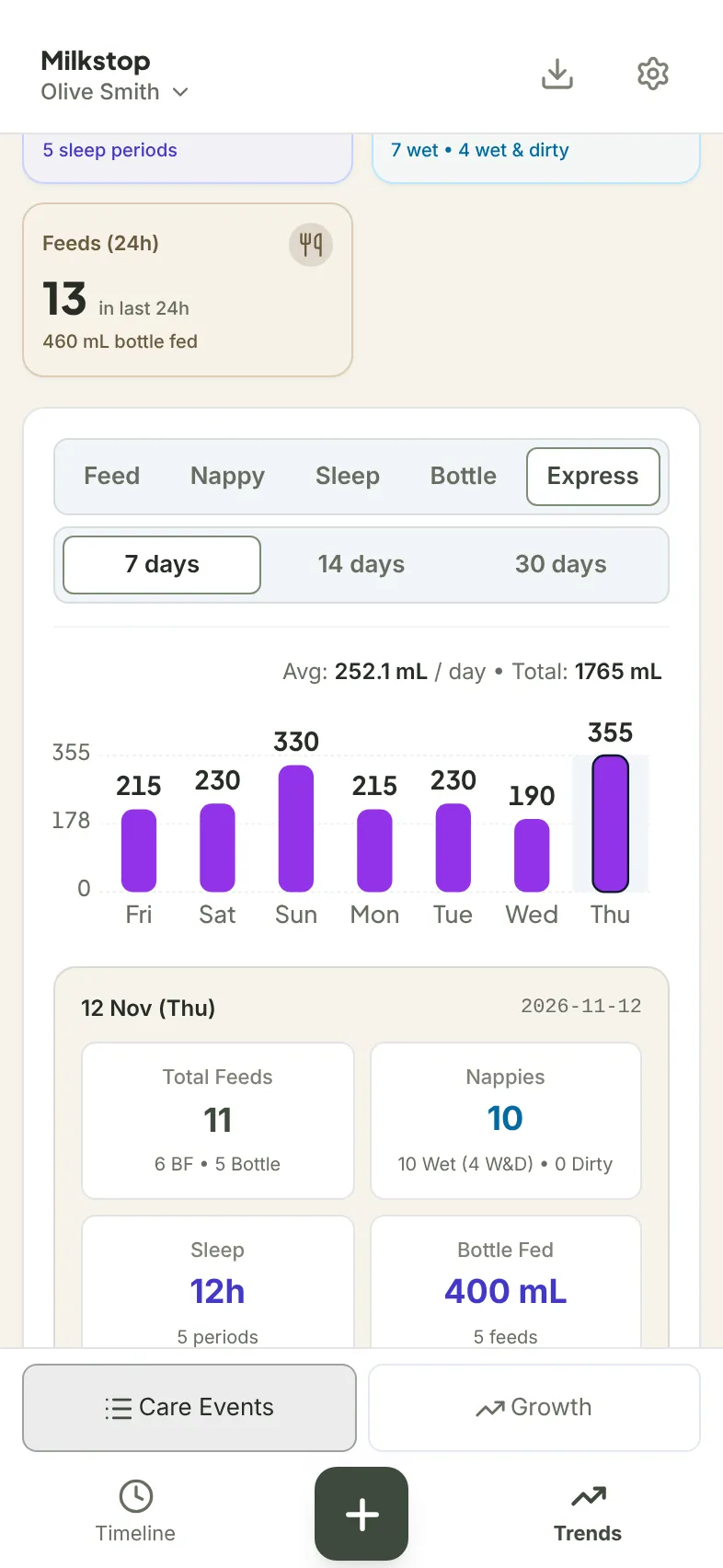
In Trends, choose Express to see how much was expressed each day over 7, 14 or 30 days, with the average per day and the total. Tap a day to see the amount expressed that day. Units follow the baby's Liquid Volumes setting (mL or fl oz).
Milkstop shows what you logged. It doesn't set targets or say how much you should express.
Sharing with your partner
Your partner joins your household with your invite code and their own sign-in. In Settings, under Family & Household Management, copy your Caregiver Invite Code and send it to them. Invite as many caregivers as you like. Each entry shows who logged it. Our guide to sharing a baby log with your partner has the full steps.
Entries sync when you're online with the app open. Once your phone has synced, your partner can pull down on the log to refresh, or reopen the app, to see your entries.
No signal?
Entries save on your phone and sync when you're back online with the app open. See how offline logging works.
Export your pumping log
Go to Settings → Baby & Routine Profiles and tap Export on your baby. For just your pumping sessions, keep only Maternal Expression ticked under Data Categories. Then choose PDF or CSV. The CSV has "Expression (mL)" and "Expression Breast" columns. PDF and CSV exports are free, up to 5 exports per hour per household. More in our baby log PDF guide.
Moving from another app?
In Settings, choose Import from another app. Milkstop can bring in pumping sessions from Huckleberry and Baby Tracker (Nighp) CSV exports, Baby Daybook backups and the Milkstop template. Pumping isn't in Hatch files, so it won't be imported. You'll see a preview first, and any caregiver can undo an import. See how to switch baby tracker apps.
What Milkstop doesn't do for pumping
Milkstop doesn't keep a milk stash or freezer inventory, and it doesn't set pumping goals. For questions about how often or how much to express, talk to your midwife, lactation consultant or child health nurse.
Milkstop is a personal log, not medical advice. If you have questions about feeding, talk to your midwife, child health nurse or lactation consultant.
What it costs
Milkstop is free to use, with no subscriptions and no feature paywalls. Some apps limit free sharing: Naluna says its free plan "includes two family members in total" (naluna.app, checked 13 Nov 2026). Milkstop is on iPhone and iPad, plus a web app at milkstop.app. Want to compare costs? See baby trackers without a subscription.
Download Milkstop on the App Store
Related
- Breastfeeding tracker app: log left, right and notes
- Feed and nappy tracker app: feeds and nappies in one log
- Newborn tracker app: one free log for both parents
- Bottle feeding tracker: one log for bottles
- Triple feeding log: breastfeeds, top-ups and expressing together
- How to share a baby log with your partner: one log for the household
- A baby tracker that works offline: logging without signal
- Baby log PDF for your GP or child health nurse: export what you've logged
- Switch baby tracker apps: bring your history with you
- Help: support questions
FAQs
Is there a free app to track pumping?
Yes. Milkstop logs each expressing session by side and amount, free to use, with no subscriptions.
What does Milkstop record for each pumping session?
The time, the side (Left, Right or both), the amount expressed in mL or fl oz, who logged it, and a note if you add one.
Can I see how much I pumped each day?
Yes. In Trends, choose Express to see the amount expressed each day, with the average and total for the range.
Can my partner see my pumping sessions?
Yes. Anyone in your household sees them once the app syncs when you're online with the app open. They can pull down on the log to refresh or reopen the app. Invite as many caregivers as you like.
What's the difference between Express and Bottle?
Express is milk you pumped. Bottle is milk your baby took, with the type: EBM, Formula or FFEBM.
Does Milkstop track a freezer stash or tell me how much to pump?
No. It's a log of what you record. For questions about expressing, talk to your midwife, lactation consultant or child health nurse.
Is Milkstop free?
Yes. Milkstop is free to use, with no subscriptions and no feature paywalls.
General information only. Milkstop is not intended to be a medical device and doesn't replace advice from your midwife, child health nurse, lactation consultant or doctor. If you're worried about your baby, contact a health professional. In an emergency call 000 (AU), 911 (US), 999 (UK) or 112 (EU).
Free · No subscriptions or feature paywalls · Works offline · iPhone app and web app